Second Week Open Studio – Bamboo

Hi…

I’m just stopping by to let you know that the second week of Open Studio at the Digital Art Academy has started, and we are working on sumi-e bamboo.  Kevin is processing a video in the background, which means he will probably not pop in and bother me.  I don’t want to hang around too long, though.

Here is my first painting for this week.  It has more of a digital feel to it than traditional sumi-e, but I liked it.  Be back later in the week with more information on brushes.

Bamboo

 Enjoy,

Skip

Eastern Water Brushes; What’s the Big Deal

I love watching You Tube videos of sumi-e paintings.  There is something intriguing about the process.  When I found out that Open Studio at Digital Art Academy was going to focus on sumi-e, I was delighted.  I began to practice.

No matter how hard I practiced, the process felt muddled.  Did I just need more practice? Of course, but who has time for practice.  Good brush painters hone their skills for decades; I had a matter of weeks.  Surely (tongue in cheek) with the right brush I could be a Master in less than a few days.  I knew it was impossible, but what else is a hardhead good for, if not for banging it against an impossible goal.

Bang one.  What is necessary for a good sumi-e brush? “Kevin?” (Dear reader, I know you do not know Kevin, but if you will bear with me, I’ll make a page explaining all about my computer Kevin, but right now, let’s just chat about the brushes.)

“Many things,” he replied rather too simply.

“Well, duh.  You champion the obvious.  I’m asking for one essential behavior.” Sometimes Kevin can be so obtuse.

“The ability to load the brush tip with one value of a color and the base with a lighter or darker value. But you will never remedy that conundrum.”

“Exactly, a perfect function of the brush.  What? Never remedy? Don’t be rude or I’ll run the CCleaner you hate?

“What we need is the ability to sample multiple colors with one brush, and Painter has that exact function.  It is located in the Mixer Pad.

Sample Multiple=

  1. This is the dropper tool, which will sample a single pixel of color
  2. This is the sample multiple colors dropper.  It will sample a range of colors from a single pixel to 50 pixels.
  3. The slider determines the range of colors.  Currently it is set to sample 24 pixels; slide it all the way to the right and it will sample 50 pixels.”

“Aha…you jest.  Are you telling me that you can eyeball 50 pixels on the screen?  I think not,” he chuckled; well it was more like a giggle.

“No, of course not.  I do a little trial and error to get the right range, but most of the time, I leave it at 50 pixels and change when needed.  Check this out.

Sample Strokes

Sample Brushstrokes with 50 Pixel Range

“The slider is set for 50 pixels and I sampled color from just beyond the tips of each arrow.  You can see the resulting strokes.  Obviously, 50 pixels is not very big; plus, there is a bigger problem.  Not all brushes can use the sample multiple function.

“Artist’s Oils Category variants can use the function, but many, for example, in the Acrylic Category cannot.  The determining factor is the Brush Dab Type, which can be found in the General Palette.”

Kevin coughed, hacked, cleared his throat; he made a noise, “Sputter. Is this the first time you have mentioned this palette?  Will the readers understand what it is?”

“Some, yes; others, no.  But I get your point.  Explain the General Palette.

“Under Window > Brush Control you will find a palette group consisting of a number of palettes relating to brush controls.  The General Palette is first in the list.

Brush controls Group Palette

Brush Controls Group Palette with Emphasis on General Palette

“If one of the following four words is listed in the first drop down menu, then the brush can sample multiple colors from the Mixer Pad: camel, flat, and bristle spray.  The illustration identifies all dab types that can use this function.

“Bang one resolved.  And you said it couldn’t be done.  All I have to do is use Camel, Flat, and Bristle Spray Brush Dab Types.”

“You got lucky.  There are many more obstacles ahead,” he said with a certain amount of glee.  He delights in my struggles.  I wonder if all computers are like that, or if I got the only one.

I promised to give you the Eastern Brushes.  Download them here.

The Eastern Brushes conversation will continue.  In the meantime, you may want to download a free webinar that Karen Bonaker and I did about how to use the Eastern Brushes.  The webinar lasted for an hour and 20 minutes, so the zipped file is around 170 MB.  You can download it at Painter Talk, but you will need to register.  It is a free forum; lots of Painter enthusiasts are members.

April edition of Digital Paint Magazine is available. It is a free subscription.

A few paintings I did in the first week of Open Studio:

Dragon Fly

Dragon Fly and Japanese Magnolia

Orchid in a Tree

Orchid in a Tree

The next image is referred to as a Haiga, a combination of Haiku and ga.

My Haiku:

Parrot tulips bright

Bring spring inside the dwelling

Winter returns grey

A Haiga...Parrot Tulip

Enjoy and see you next post,

Skip

Open Studio Assignment, Cherry Blossoms

Today was the first day of Open Studio at the Digital Art Academy.  Time to give my shiny new brushes a try.  I dubbed them Eastern Water in deference to sumi-e style paintings.  I wish I could tell you that I successfully culled them, but strangely the numbers increased to a colossal number, 42, which has cult status and is the answer to the ultimate question of life, the universe, and everything.

Armed with the answer to everything, I began to paint the assignment, cherry blossoms.  My first attempt was rather stiff, as was my second, third, fourth and fifth.  Then I had an “aha” moment.  I noticed the weeping cherry in full bloom outside my window.  Duh, it is much easier to paint when you have the real thing as your reference.  I cut a branch and brought it inside.

Have you ever tried to put weeping cherry in a vase.  I’m sure florist know how to do it, but my little weepy branch kept falling out.  I finally propped it and vase in a vertical position, which meant the flowers were upside down.  I found a workaround.  I painted a little; extracted the branch from the vase and observed the flowers in their normal position, and then returned them to the vertical.  Hey, the answer to everything is pretty handy. 

Alpha channels are pretty handy in Painter, too.  Alpha channels are defined as a storage device for selections, but I think of them as super selectors.  To start this painting, I first created an alpha channel.  My intent is not to make a tutorial about this painting, but simply show the workflow through a series of screen shots.  This is the alpha channel after painting it with short vertical strokes.  When a selection is created the black areas will be protected and the lighter areas are available for paint, which is just the opposite of a layer mask.

Texture applied to alpha channel

Alpha channel prepared with texture

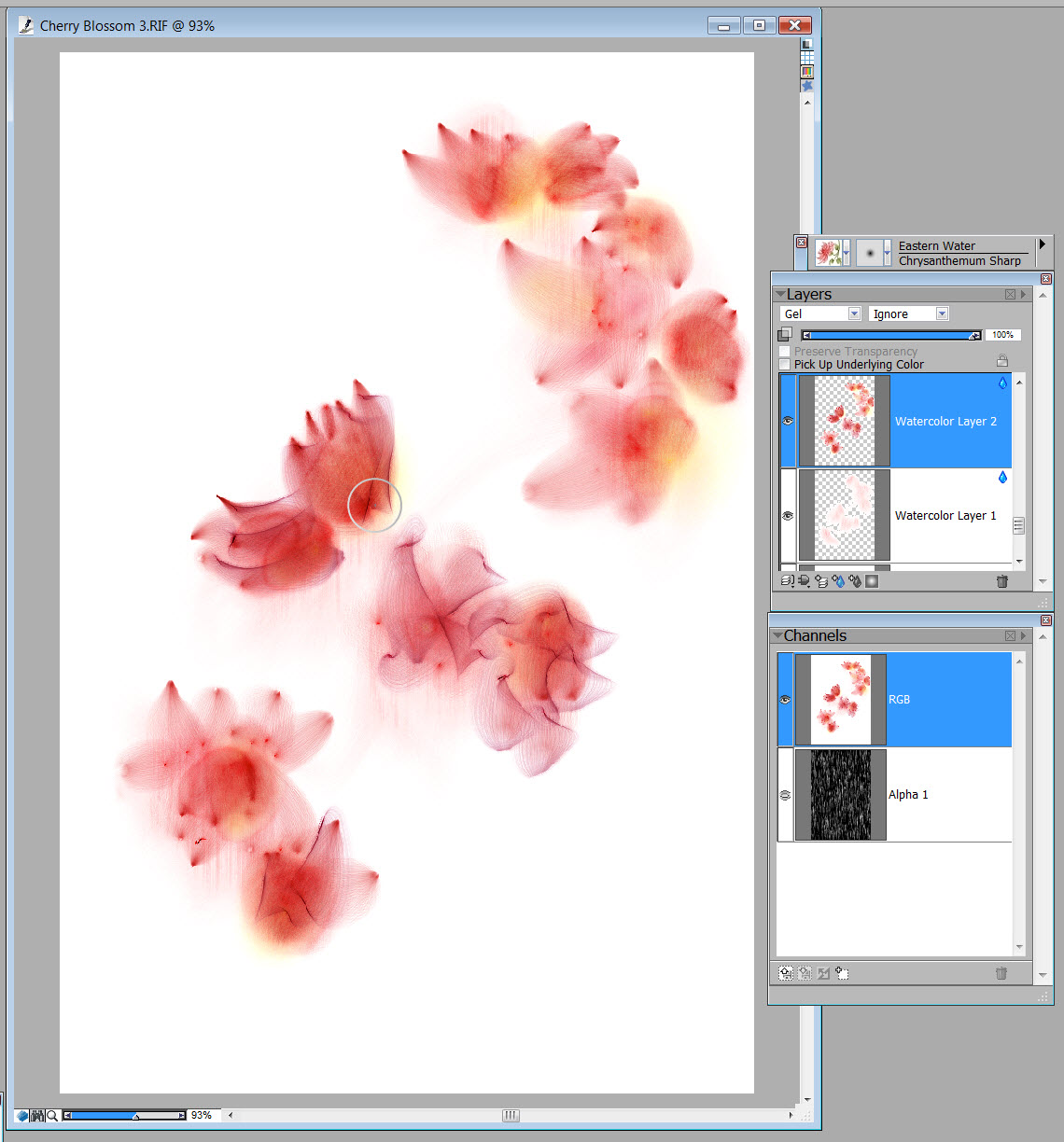
I added a watercolor layer.  Using my Textured Fill Wet variant I lightly and softly identified the areas where the blossoms would be.

Placement of flowers

Determining the placement of the flowers

Added an additional watercolor layer; I work with a lot of layers.  I used my Chrysanthemum Sharp variant to give some form to the flowers.  I inadvertently continued painting on this layer with Iris Blade, but I wanted to be on another layer.  I deleted what I could.

Giving form to the flowers

Giving some form to the flowers.

On the third watercolor layer I used Iris Blade to give a soft overlay that looks like a petal.

Adding soft petals

Adding soft petals

The center of the flowers and the branch was painted on layers 4, 5, and 6.  I used several brushes, Chrysanthemum Sharp, Bamboo Texture Sharp, Thistle, and Plum Anther.

Flower details and the branch

Added flower details and the branch in the next three layers.

Layers 7 to 10 finished the details of the painting, buds and the first early leaves just barely showing.  At this point I did an Iterative Save and then dropped all layers.

Added buds and the beginning of leaves opening.

Added green buds and leaves just beginning to open.

I didn’t like the composition and added some canvas to the left and bottom of the image.  Also added my name in Chinese characters, at least I think that is what it is.  I got it from one of those sites that claims to write your name in Chinese; it could be profanity for all I know.

Improved composition

Improved composition by adding area to the left and bottom of the canvas, and added my signature in Chinese characters.

When I increased the size of the canvas, the alpha channel did not have any texture in the extra area.  I created a new alpha channel that was the correct size and with the same style texture.  I loaded the selection from this channel and in two layers painted the background.  I reduced the opacity of the layers for the finished piece, but in this screen shot I left the background at 100% opacity so you can see the texture.

Texture layer

Added texture from alpha channel selection. In the final piece, the texture will be reduced in opacity greatly.

I added a frame to finish the work.  I hope you enjoyed this quick look at the workflow of this painting.

Finished with frame

Added a frame for the final image

Here is the zip file of the Eastern Water Brushes.  They are compatible with Painter IX, X, and 11, thanks to Brush Master David Gell, who has created a script to automatically adjust the brushes for backward compatibility.  The brushes can be installed using the Studio Chris Brush Manager.

Zip file will be added later; I can’t figure out how to add it now.

Enjoy,

Skip

Culling and Naming Brushes; Brutal

I am so excited.  Open Studio starts next Saturday at Digital Art Academy.  We are going to study sumi-e painting, which is one of my favorite art forms.

To get ready, I started researching sumi-e by watching You Tube “how to” videos and trying it myself in Painter 11.  Guess what?  It “ain’t” so easy, at least not digitally.  To make life simpler, I decided to create some brushes that I thought would make the process easier.  Did I just write that?  Anybody got any whiteout?

Simple, easy, and brush creation do not belong in the same paragraph.  Brush creation can be frustrating, and it can be satisfying.  In Painter 11, there are a seemingly infinite number of controls, yet the one tweak that I need to make the perfect brush is just out of reach, so frustrating.  However in the search for the ideal brush for sumi-e, many flawless brushes for different styles develop, which can be very satisfying.

Many does not describe the actual reproduction phenomenon.  Brushes ripen in numbers equal to the spore of a mushroom.  In case you don’t know, that’s a whole bunch.  So, I need to cull and name.  Have you ever tried to name a brush.  Think about it.  It has a stick and some bristles.  What do you name something like that? If you think about it, digital brushes have neither stick nor bristles, but are pretend brushes.  The difference between digital and traditional will have to wait until another day, besides, the function of the brush is most important.

I like the name of the brush to reflect its function, but that isn’t always so easy.  In this current set, I made a brush I called curly leaf because it made a curly leaf.  But then I proceeded to make 11 variations of that brush, each called curly leaf followed by a number; curly leaf 1, 2, 3, etc.  I know, it is not very original, but in the heat of tweaking, naming is not a high priority.

Tweaking is over; naming and culling are hot.  In my last set, I had descriptive names like rouge, powder, lipstick, and I have a mind to continue descriptive names with this set.  If I do, there will be names like Iris Blade, Carnation Splash, and Thistle Prickles.  I wonder if I have the first signs of dementia.   

Okay, so I am naming and culling; luckily, I have experience.  I used to raise fancy goldfish.  Some babies got named and some got eaten by the Red Oscars.  Naming and culling can be brutal.  Mistakes will be made.

Here is a sample page of the brushes that have made the first cut, but are yet to be named and still in danger of being culled. 

Masterpiece in the works

Brushes from the first cull

Notice how similar they look at first glance.  So, how do I decide who makes the grade.  For me it is through application.  Normally, I don’t start creating a set of brushes without some idea of their function.  In this case, I’m interested in sumi-e.  I need brushes that can help me create the essence of a form, without giving too many details.

Want to see some brushes in action.  Check out this video.

In another post, I’ll talk about tweaking brushes, but today, all I can think about is culling, naming and getting ready for Open Studio.

Puzzled, Confused, Mystified, Confounded

I’m perplexed.  I am writing my first blog entry for a class I am taking at LVS called Basic Blogging, or is it Blogging Basics; could be neither.  The name might be Writing 101, but who cares; it is essentially an exercise in writing, which is not my strong point.  I much prefer talking.  I love the spontaneity of a chat. No problems worrying about how to start with a chat.  Hi works almost every time.   Yes, I’m perplexed.  How do you start writing a blog? Should I express my feelings of concern as I am doing now, or…or what. 

Or what; that is a big subject.  Think Skippy, what is this blog about anyway?  What did you decide for a subject; who is your target audience; what is your authority?

I don’t care.  I know we discussed those things, and I posted my intent, but those were just words.  What I am feeling now is complete fear.  Fear of failure; fear of inadequacy, fear of looking foolish are all popping into my mind.  Plus, I still don’t know how to start this darn blog.

Wait.  What is this I see?  Three paragraphs proceeding this one.  Oh my, I have started blogging!  Easy as pie!  I’m a natural.  No sweat.  Just sit down and begin writing.  This is so cool. 

Hold on Skippy.  What about the subject of your blog?  Remember, I think you were going to discuss Painter.

Leave me alone.  I’m on a roll; words are flying from my fingers.  I feel like I am having a chat.  Ha, I guess I am having a chat with you.  Who are you anyway?

Does that matter?  Let me ask you a question.  How are you going to end this post? 

End this post?  I don’t know; it would be easy if I were having a chat.  I would just say goodbye and walk along. 

Oh gosh, I’m perplexed.  I am writing my first blog entry for a class I am taking at LVS called Basic Blogging, or is it Blogging Basics; could be neither, and I don’t know how to end the post.