Paper Drips Library for Earlier Version Of Corel Painter

Hello Everyone,

Previously I provided my Corel Painter 12 Paper Library, Paper Drips, for Painter 12 users.  Then I found out it was only compatible for PC users.  David Gell provided a version that is compatible for Corel Painter 12 MAC users…see previous post today.  However, if you are using an earlier version of Corel Painter you are out of luck…until now. 

Our friend David Gell, when correcting the paper for MAC users, pulled out the JPEGs used to create the papers and provided them in a zip file.  That means that if you are using Painter IX – 11, you can open a paper JPEG, select all, and then use the capture paper command in your paper palette options menu to make the paper yourself.  I put the crossfade slider on zero rather than letting it default to 16.

Paper Drips JPEG Downloads

David, thank you again for your valuable help. 

Enjoy,

Skip

Free Corel Painter Brushes, Drips and Runs, Backward Compatible to Painter IX – 11

Hello Everyone,

Again, we have David Gell to thank for this.  In Drips and Runs, there are several variants that use the new Real Watercolor brush engine in Painter 12.  Those cannot be made backward compatible.  I removed those variants and David took the rest and performed his magic.  This set will have 9 variants instead of the original 16.  I hope you enjoy the set.  To separate from the Drips and Runs for Painter 12, I call these WC Drips and Runs.

WC Drips and Runs IX – 12

I can hear you saying, but where are the papers.  See the next post.

Enjoy,

Skip

Correction: Paper Drips for MAC Users

Hello Everyone,

Mea culpa!  David Gell, the most knowledgeable Painter user I know, reminded me that there is a problem with exporting a Painter 12 Paper File from a PC to a MAC.  If you are a Painter 12 MAC user and downloaded Paper Drips, it will not work for you.  Please take the time to go to Painter Factory and read the thread about Library Import Scripts Mac OSX.  You can download the script and then convert papers given to you by PC users to something that works on the MAC.  David kindly provided the converted paper for MAC Painter 12 users.

Paper Drips for Painter 12 Mac Users

Many thanks again to David.  If you haven’t been to his website, do visit it.  Click on the link in my Blogroll.  I know you will enjoy his site.

Enjoy and sorry for the mixup,

Skip

“Dummy!”

“Good grief, Kevin, not now!”

Painting Portraits in Painter or Photoshop Announced at The Artist’s Quarter.

Hello Friends,

From time to time I’ll post some general news and this is one of those times.  Tim Shelbourne at The Artist Quarter is having a new “live” portrait class on-line.  Sound interesting; it should.  Tim’s classes are excellent and doing them live on-line feels like you have traveled to Tim’s studio in England for a live workshop.  If you cannot attend all the sessions, no problem, Tim records them for download.  The class teaches portraits from scratch, but don’t worry if you can draw or not; Tim will lead you every step of the way.  Surprises and delights in your results await you.

For information, click on this link.

Portraits from Scratch in Painter and/or Photoshop

I have taken Tim’s classes and can highly recommend them.  Do check it out.

See you in class,

Skip

Free Corel Painter 12 Brushes – Drips and Runs

Hello Everyone,

I know I promised to do another video on cloning and I will, but I realized that I need to make the brushes that I am using available to everyone.  I am making the Papers available, too.

Please note: the brushes and the papers will only work in Painter 12.

Some of the variants will work with earlier versions, but not in this set.  I will need to separate them from the Real Watercolor variants.  I will see what I can do.

To load the papers, open the paper library panel and hit the options button.  Select import paper library and navigate to where you downloaded the file.

Here is a video giving you a little information about these variants.

Download the variants and papers here:

Drips and Runs, Paper Drips

Hope you enjoy these variants and papers.

Skip

Watercolor Clone in Painter 12 Done Simply

Hello Everyone,

Several students and blog followers asked me to do a video tutorial on cloning in Painter 12.  Cloning isn’t a simple subject.  But before I get started, don’t forget that Holiday Open Studio starts Saturday 11/19/2011 at the Digital Art Academy.  This is one of the most fun classes at DAA.  You can use Painter X, 11 or 12.  It is for beginners and experts alike.  Please click on this link and check out Open Holiday Studio.

Cloning has many options and the results do not have to look photographic; the term creative cloning is alive and well, at least it is on this blog. 🙂  My plan is to do a series of cloned paintings, starting with this one of a cardinal that uses a very simple approach to cloning.  How many will be in the series? I don’t know, but at least one more.  Each will be a bit more complicated than the previous.

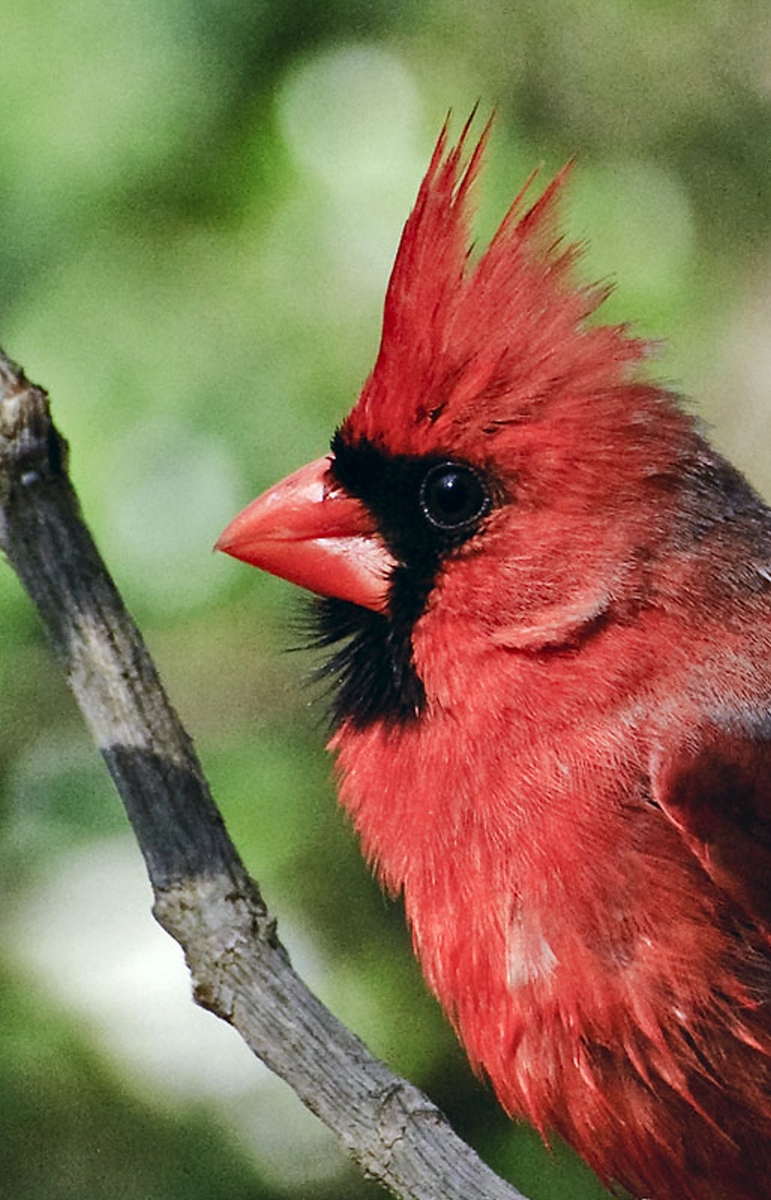
In this tutorial, I am going to use this photograph I snapped of a cardinal sitting outside a window in my computer room:

Cardinal

In the videos you will see me create this clone of the cardinal.  You will see everything I do in about 50 minutes; I decided not to do any speed painting.

Cardinal

In the first video I create the background with clone color and very wet watercolor variants.

In the second video I begin to clone paint the subject.

As usually happens, I messed up stuff in the third video.  I decided to leave it and show you how I fixed my problems.

The final video completes the image; I hope you like it.

Well, that is it.  What do you think?

“I think it is pitiful.”

“I’m not asking you Kevin.  Of course you think it is pitiful; you are so negative.”

“I’m far from negative.  Don’t forget I am a good virus, and I am optimistic, too, except….  I better not say.  I want to stay positive and upbeat.”

I can tell that he is baiting me.  He wants me to argue, but not this time.  “You are right.  You are so positive and upbeat as all good viruses are.  I am so lucky to have you staying on my computer.”

“Aha!  You lie.  You don’t believe what you said.” he was almost screaming.

“I do believe you are positive and upbeat all the time.  I am glad that you are, too.  I am in the market for a new computer, and when I buy it, I will retire this computer.  How about that.  I’ll plan a retirement party,” I tried not to chuckle.

“You are buying a new computer?  Well, no problem, if you transfer anything from this computer to the new computer I’ll tag along.”

“Awe, I’m sorry.  I have already downloaded what I need for the new computer.  I guess you didn’t notice when I was doing it.”

“I thought you were doing a back up.  Surely you will not leave me alone on this computer.  After all I have done for you; surely you will take me with you.”

Well folks, that’s all I have today.  I hope you enjoy the videos.

Skip

Registration for Holiday Open Studio at DAA is Open; Join Us for a Fun Filled Month Working with Corel Painter

Hello Everyone,

Corel Painter Master, Karen Bonaker, announced the opening of registration for Holiday Open Studio at Digital Art Academy (DAA) at Karen Bonaker Art, her wonderful blog. Do go by and take a look at the information  and syllabus for this 4 week course.  Holiday Open Studio is for anyone, beginner and expert a like.  Each week there is a new leader with a special topic.  Class begins 11/19/2011 and ends 12/16/2011.

The first week, Karen shows how to create and paint a perfectly balanced Holiday flower arrangement.  Take a look at this image, which can also be seen at her blog.

Lovely painting by Corel Master Painter, Karen Bonaker. Learn how she does it in Holiday Open Studio 2011

I have the second week.  Learning to leave white space in a watercolor is difficult.  I am focusing on snow scene landscapes with lots of white space.

Simple snow scene landscape done in Painter 12

Corel Painter Educator and Expert, Elaina Moore-Kelly, has the third week.  Elaina wows everyone with her beautiful Holiday Greeting Cards.  Discover her secrets for Corel Painter as she demos greeting cards.

Examples of Elaina Moore-Kelly Greeting Cards; Done in Painter 12

Karen returns for the fourth week.  Holiday Wreaths and winter scenes are the topic.  She has prepared a custom set of brushes for this workshop, which each student will receive.  I think Karen’s work is stunning.  What do you think?

Corel Master Painter, Karen Bonaker's Holiday Wreath.

That’s about it.  Do go by and check out Karen Bonaker Art and view her video from Holiday Open Studio 2010; you will be glad that you did.

Enjoy,

Skip

Wacom Intuos and Cintiq Driver Update for MAC OS X v 10.7, 10.6, and 10.5 (Intel)

Hey Folks,

On October 13, 2011, Wacom released a new driver for the Americas (the United States, Canada, and Latin America).  I glanced at Europe and it didn’t look like the driver was available for that region yet; I didn’t check any others.

There isn’t a new driver for the PC since the one released on Sept 13, 2011.

Wacom Driver Page

I suspect this is a significant update.  MAC users…go get it!

Skip

Thanks Carlos for letting me know about the update.

Corel Painter 12 Classes Start Saturday

Hello Everyone,

I’m always nervous prior to class starting.  I’m extra distraught this time because I have two new classes starting; The Basics of Watercolor in Painter 12 and The Basics of Brush Making in Painter 12.  My other class, Painter 12 a New Beginning, will also start on Saturday;  this class is for folks who have a good working knowledge of Painter 11 or earlier and are upgrading to Painter 12.  If you are new to Corel Painter and now have Painter 12, Elaina Moore-Kelly teaches the perfect class for you, Introduction to Painter 12 – Part 1.  Check out the Digital Art Academy and look at all the class offerings.

I was preparing class material and doing a watercolor made up primarily of washes.  In the end, I cropped several paintings from the original.  After class gets underway, I’ll post more videos about working with watercolor in Painter 12.

Landscape

Landscape with washes in Painter 12

Got to run and get back to work getting the classes ready.  Join Elaina or me for some fun in Painter 12.

Enjoy,

Skip

Pressure Sensitivity with Cool Spring for Painter 12

Hello Everyone,

I have heard from some folks that they cannot get the same sort of marks with Cool Spring and Bristly Dab variants that I can get.  I think I know why.  Pressure sensitivity is the key.  A Wacom Intuos 4, fabulous machine, is able to use 2048 levels of pressure.  That’s a wow in anyone’s book.  But, are we using all 2048 levels; I’m not sure, but I surely want to try.  And if I want to get any kind of decent marks with these variants, I must apply paint very sensitively.

“Ha, you sensitive? Never going to happen!”

“Awe, Kevin, you promised you wouldn’t bother me any more while I am making posts.”

“And you promised to feed me better, but all I get is bugs!  I know you like a bug free machine, but making me eat them is plain mean,” he whimpered in his best hurt voice.

“I thought you liked bugs.  Aren’t they nutritious and tasty?”

“I would like to remind you that good viruses eat memory, not bugs.  Making a good virus eat bugs is comparable to your dog eating the neighbor cat’s pooh!”

“Alright, that is enough…get in the closet…NOW!”

Sorry about that, now where was I?  Oh yes, pressure sensitivity is the key to making good marks with Cool Spring.  I did a quick video while making the following sky.

Sky created in Painter 12 using Cool Spring variants. See Video

I hope the video shows pressure sensitivity when using Cool Spring as well as Bristly Dabs is crucial.  It is very important to play with your brush tracking settings.  But, more importantly, practice making strokes.  Practice, Practice, Practice is key.

Please feel free to comment, ask questions, or console Kevin.

Enjoy,

skip