Correction: Paper Drips for MAC Users

Hello Everyone,

Mea culpa!  David Gell, the most knowledgeable Painter user I know, reminded me that there is a problem with exporting a Painter 12 Paper File from a PC to a MAC.  If you are a Painter 12 MAC user and downloaded Paper Drips, it will not work for you.  Please take the time to go to Painter Factory and read the thread about Library Import Scripts Mac OSX.  You can download the script and then convert papers given to you by PC users to something that works on the MAC.  David kindly provided the converted paper for MAC Painter 12 users.

Paper Drips for Painter 12 Mac Users

I am sorry; this download is not longer available

Many thanks again to David.  If you haven’t been to his website, do visit it.  Click on the link in my Blogroll.  I know you will enjoy his site.

Enjoy and sorry for the mixup,

Skip

“Dummy!”

“Good grief, Kevin, not now!”

Free Corel Painter 12 Brushes – Drips and Runs

Hello Everyone,

I know I promised to do another video on cloning and I will, but I realized that I need to make the brushes that I am using available to everyone.  I am making the Papers available, too.

Please note: the brushes and the papers will only work in Painter 12.

Some of the variants will work with earlier versions, but not in this set.  I will need to separate them from the Real Watercolor variants.  I will see what I can do.

To load the papers, open the paper library panel and hit the options button.  Select import paper library and navigate to where you downloaded the file.

Here is a video giving you a little information about these variants.

Download the variants and papers here:

Drips and Runs, Paper Drips

Hope you enjoy these variants and papers.

Skip

Watercolor Clone in Painter 12 Done Simply

Hello Everyone,

Several students and blog followers asked me to do a video tutorial on cloning in Painter 12.  Cloning isn’t a simple subject.  But before I get started, don’t forget that Holiday Open Studio starts Saturday 11/19/2011 at the Digital Art Academy.  This is one of the most fun classes at DAA.  You can use Painter X, 11 or 12.  It is for beginners and experts alike.  Please click on this link and check out Open Holiday Studio.

Cloning has many options and the results do not have to look photographic; the term creative cloning is alive and well, at least it is on this blog. 🙂  My plan is to do a series of cloned paintings, starting with this one of a cardinal that uses a very simple approach to cloning.  How many will be in the series? I don’t know, but at least one more.  Each will be a bit more complicated than the previous.

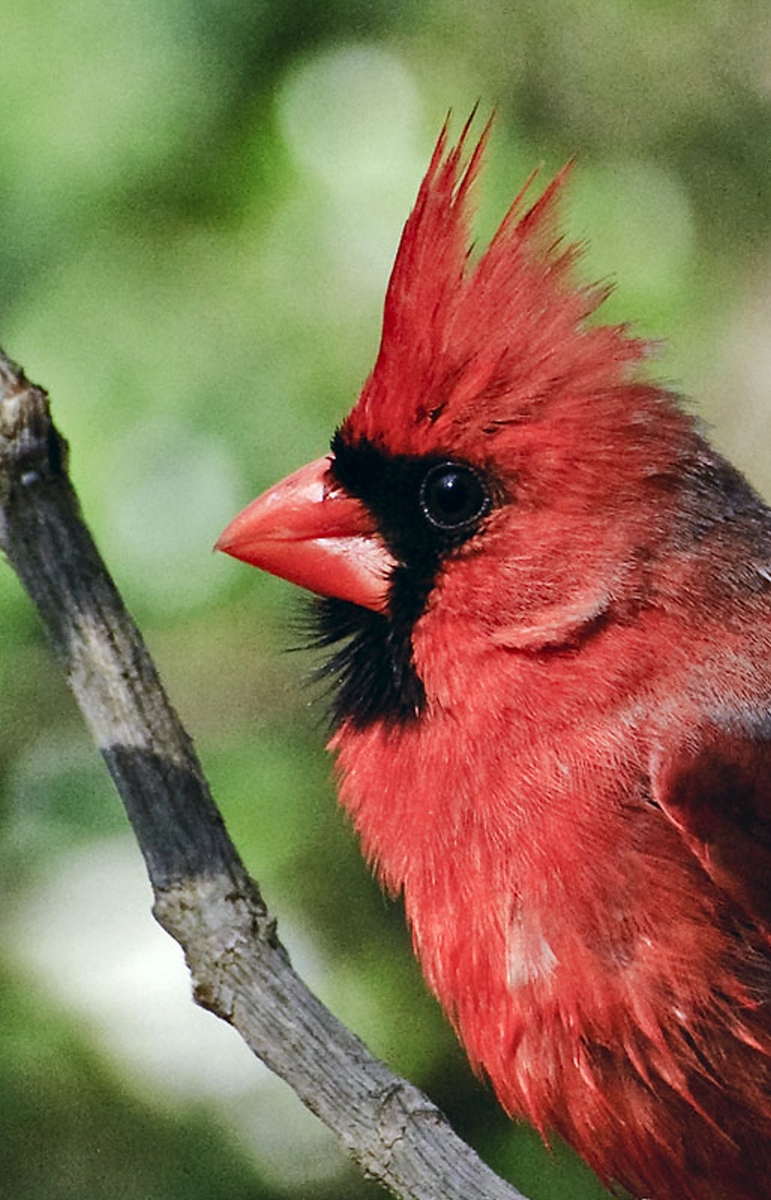
In this tutorial, I am going to use this photograph I snapped of a cardinal sitting outside a window in my computer room:

Cardinal

In the videos you will see me create this clone of the cardinal.  You will see everything I do in about 50 minutes; I decided not to do any speed painting.

Cardinal

In the first video I create the background with clone color and very wet watercolor variants.

In the second video I begin to clone paint the subject.

As usually happens, I messed up stuff in the third video.  I decided to leave it and show you how I fixed my problems.

The final video completes the image; I hope you like it.

Well, that is it.  What do you think?

“I think it is pitiful.”

“I’m not asking you Kevin.  Of course you think it is pitiful; you are so negative.”

“I’m far from negative.  Don’t forget I am a good virus, and I am optimistic, too, except….  I better not say.  I want to stay positive and upbeat.”

I can tell that he is baiting me.  He wants me to argue, but not this time.  “You are right.  You are so positive and upbeat as all good viruses are.  I am so lucky to have you staying on my computer.”

“Aha!  You lie.  You don’t believe what you said.” he was almost screaming.

“I do believe you are positive and upbeat all the time.  I am glad that you are, too.  I am in the market for a new computer, and when I buy it, I will retire this computer.  How about that.  I’ll plan a retirement party,” I tried not to chuckle.

“You are buying a new computer?  Well, no problem, if you transfer anything from this computer to the new computer I’ll tag along.”

“Awe, I’m sorry.  I have already downloaded what I need for the new computer.  I guess you didn’t notice when I was doing it.”

“I thought you were doing a back up.  Surely you will not leave me alone on this computer.  After all I have done for you; surely you will take me with you.”

Well folks, that’s all I have today.  I hope you enjoy the videos.

Skip

Registration for Holiday Open Studio at DAA is Open; Join Us for a Fun Filled Month Working with Corel Painter

Hello Everyone,

Corel Painter Master, Karen Bonaker, announced the opening of registration for Holiday Open Studio at Digital Art Academy (DAA) at Karen Bonaker Art, her wonderful blog. Do go by and take a look at the information  and syllabus for this 4 week course.  Holiday Open Studio is for anyone, beginner and expert a like.  Each week there is a new leader with a special topic.  Class begins 11/19/2011 and ends 12/16/2011.

The first week, Karen shows how to create and paint a perfectly balanced Holiday flower arrangement.  Take a look at this image, which can also be seen at her blog.

Lovely painting by Corel Master Painter, Karen Bonaker. Learn how she does it in Holiday Open Studio 2011

I have the second week.  Learning to leave white space in a watercolor is difficult.  I am focusing on snow scene landscapes with lots of white space.

Simple snow scene landscape done in Painter 12

Corel Painter Educator and Expert, Elaina Moore-Kelly, has the third week.  Elaina wows everyone with her beautiful Holiday Greeting Cards.  Discover her secrets for Corel Painter as she demos greeting cards.

Examples of Elaina Moore-Kelly Greeting Cards; Done in Painter 12

Karen returns for the fourth week.  Holiday Wreaths and winter scenes are the topic.  She has prepared a custom set of brushes for this workshop, which each student will receive.  I think Karen’s work is stunning.  What do you think?

Corel Master Painter, Karen Bonaker's Holiday Wreath.

That’s about it.  Do go by and check out Karen Bonaker Art and view her video from Holiday Open Studio 2010; you will be glad that you did.

Enjoy,

Skip

Corel Painter 12 Classes Start Saturday

Hello Everyone,

I’m always nervous prior to class starting.  I’m extra distraught this time because I have two new classes starting; The Basics of Watercolor in Painter 12 and The Basics of Brush Making in Painter 12.  My other class, Painter 12 a New Beginning, will also start on Saturday;  this class is for folks who have a good working knowledge of Painter 11 or earlier and are upgrading to Painter 12.  If you are new to Corel Painter and now have Painter 12, Elaina Moore-Kelly teaches the perfect class for you, Introduction to Painter 12 – Part 1.  Check out the Digital Art Academy and look at all the class offerings.

I was preparing class material and doing a watercolor made up primarily of washes.  In the end, I cropped several paintings from the original.  After class gets underway, I’ll post more videos about working with watercolor in Painter 12.

Landscape

Landscape with washes in Painter 12

Got to run and get back to work getting the classes ready.  Join Elaina or me for some fun in Painter 12.

Enjoy,

Skip

Pressure Sensitivity with Cool Spring for Painter 12

Hello Everyone,

I have heard from some folks that they cannot get the same sort of marks with Cool Spring and Bristly Dab variants that I can get.  I think I know why.  Pressure sensitivity is the key.  A Wacom Intuos 4, fabulous machine, is able to use 2048 levels of pressure.  That’s a wow in anyone’s book.  But, are we using all 2048 levels; I’m not sure, but I surely want to try.  And if I want to get any kind of decent marks with these variants, I must apply paint very sensitively.

“Ha, you sensitive? Never going to happen!”

“Awe, Kevin, you promised you wouldn’t bother me any more while I am making posts.”

“And you promised to feed me better, but all I get is bugs!  I know you like a bug free machine, but making me eat them is plain mean,” he whimpered in his best hurt voice.

“I thought you liked bugs.  Aren’t they nutritious and tasty?”

“I would like to remind you that good viruses eat memory, not bugs.  Making a good virus eat bugs is comparable to your dog eating the neighbor cat’s pooh!”

“Alright, that is enough…get in the closet…NOW!”

Sorry about that, now where was I?  Oh yes, pressure sensitivity is the key to making good marks with Cool Spring.  I did a quick video while making the following sky.

Sky created in Painter 12 using Cool Spring variants. See Video

I hope the video shows pressure sensitivity when using Cool Spring as well as Bristly Dabs is crucial.  It is very important to play with your brush tracking settings.  But, more importantly, practice making strokes.  Practice, Practice, Practice is key.

Please feel free to comment, ask questions, or console Kevin.

Enjoy,

skip

Free Corel Painter 12 Brushes; Cool Spring

Hello Everyone,

I finally got the Corel Painter 12 watercolor brushes finished and named them Cool Spring.  I hope you like them.  I would suggest installing these variants in their own library; like all watercolor brushes they are a bit slow, but putting them in their own library helps.  Don’t forget that my Basic Watercolor with Painter 12 and Basic Brush Making with Painter 12 start on Oct 22.  Come join the classes; I promise we will play a lot. 🙂

I produced two videos showing a bit about the variants.  In Part 1, I did the following image using 2 very wet brushes and about 8 stokes.  It is great fun to watch the paint bleed into the paper and create beautiful blends.

From Part 1 Cool Spring

Beginning image created with 2 very wet variants and about 8 stokes. See Part 1 Cool Spring video.

Let me know what you think of the brushes.  I’m always open to suggestions.

Cool Sping Download

Enjoy,

Skip

Corel Painter 12 Hot Fix for Mac OS 10.7 Lion is Available for Download

Hello Friends,

I missed this, but Elaina Moore-Kelly didn’t on her blog, Paint Spatter, Corel Painter 12 Tips, Tricks, and Topics.  Thanks Elaina.

Hot Fix for Mac OS® X Lion 10

Also visit Elaina’s blog for a good suggestion when installing the hot fix.

Thanks again to Elaina Moore-Kelly for keeping us up-to-date.

Enjoy,

skip

Tim Shelbourne Demonstrates Bristly Dabs

Hello Everyone,

I have a special treat for all of you.  I hope those who have visited will come back for this new video from Tim Shelbourne, the creative genius behind  The Artist Quarter.  I am a big fan of Tim, the way he paints, and most of all his method of teaching.  He approaches everything from a traditional artist standpoint, even though he has painted digitally for many years.  I am a subscriber of The Artist Quarter and highly recommend it for everyone.  Tim is at home with Photoshop as well as with Painter 12.  He has a very unique way of cloning in Photoshop CS5 that I have not seen anywhere.

Check out his impasto sketch that he did with the Bristly Dabs in Painter 12.  And then for a real treat, watch the video and see him talk about how he is using them.  He is a bit gushy about the brushes; I turned red, but I can’t tell you how pleased I am that someone with his painting skills likes the new variants.  And, he is going to show you some nice tricks with Painter 12.  Tim, my friend, thank you so much for sending this video.

Before I go to the image and video, I wanted to mention something that Tim is doing that is very unique.  He is having online ateliers, French for workshop.  I have attended several and they are fantastic.  It is like having a workshop in person, but you don’t leave your house.  The workshop last for several days or weeks.  We have video materials, PDFs, and even special brushes to download.  On the first day we meet via Go To Meeting and Tim gives a live demonstration and takes questions.  Tim records the live demonstrations and makes them available for the attendees.  Then we meet several more times for live demonstrations and a chance to show our work to other participants and get live critiques.  I love these workshops.  Visit The Artist Quarter, you will be glad that you did.

Here is the quick impasto sketch that Tim demonstrates in the video:

Tim's Impasto Sketch done in Painter 12

Tim is all about teaching how to paint.  You will see in his video:

Tim, I want to thank you again for doing this video.  I think many folks will paint with these new variants thanks to your inspiration.

I hope y’all enjoyed this special treat, if you did let us know.

Skip

Bristly Dabs for Painter 12 and Backward Compatible to Painter IX.

Hello Everyone,

I have just made a download page for my newest brush set, called Bristly Dabs.  Thanks to David Gell, Master of all things Painter, the sets are backward compatible to Painter IX. Thank you David!!!

Download one or both sets.  One called PIX_Bristly_Dabs.zip does not use rotation expression.  The other called PIX_Bristly_Dabs_Rtn.zip uses rotation expression in three variants.  If you have an art pen for any version of a Wacom tablet, download the file with Rtn in the name.  I think you will enjoy using barrel rotation with these brushes.  The brushes contain impasto and non-impasto brushes.

There are some very specific caveats when using these brushes especially in Painter 12.  I prepared 3 videos illustrating how to use the brushes.  The first one describes the techniques used with Bristly Dabs.  The other two give more details about using the variants and information about impasto in general.  It is imperative that you watch the videos.  All three are helpful, but the last two are the most helpful.  If you do not watch any videos, do at least read the points listed on the download page.

Here is the sample painting done with Bristly Dabs in Painter 12:

Vase and Windwo

Using Bristly Dabs in Painter 12

The next video takes you through the process of the painting.

These two videos are specifically about the brushes.  Part 1 talks about the Well Panel with Resaturation, Bleed, Dry Out and Brush Loading

Part 2 illustrates the Impasto Panel. 

I hope you enjoy the videos and the brushes. 

Don’t forget, I have these classes starting October 22 at the Digital Art Academy.  Click the class name for more information.

Basics of Watercolor in Painter 12

Basics of Brush Making in Painter 12

Painter 12, a New Beginning  (this is for experienced painter users who are upgrading to Painter 12)

You may want to take Elaina Moore-Kelly’s class, Introduction to Painter 12 – Part 1, designed for someone just starting out with Painter 12.  It is a fabulous course. Also, Elaina teaches Creative Collage: Scrap Techniques With Painter, which uses Painter 11.

Do visit the Digital Art Academy and look at the other classes available.

I guess that is it for this post.  I can go let Kevin out of the bathroom.

“I’m behind you.”

“Gasp! Kevin you scared me half to death!”

“Yeah, well you tried to lock me in the bathroom.  I chewed my way out.”

“What, you did what?” I dashed to the bathroom. 

OMGosh, it is awful, there is a man-sized hole in the door.  Shutting the door offers no privacy now.  I hear a cackling laugh coming from the computer room.  I got to run.  I think I am going to need a new bathroom door. 

Y’all let me know how you like the brushes,

skip